
Digital minimalism is basically choosing a smaller, calmer tech life on purpose — not because you’re allergic to fun, but because your phone has started acting like a needy roommate. You keep opening it to check one thing… and 27 minutes later you’re watching a stranger restock a fridge in perfect silence. (Why is it soothing. Why.)
I’ve been seeing “digital minimalism” pop up in places that aren’t even trying to be deep: TikTok captions, “reset your brain” YouTube videos, productivity threads where someone casually says, “Oh I don’t have apps.” Like it’s a personality.
And honestly? I get it. The vibe is: “I’m not quitting technology. I’m putting it back in its place.”
I used to think digital minimalism was just “delete everything and live like a monk.” I ignored this for way too long because I assumed it was going to be smug.
It’s not smug when you do it right. It’s… relief.
Answer Box: digital minimalism, fast
- What it means: Using fewer digital things, more intentionally — keeping what genuinely helps, removing what drains you.
- When people use the term: When they’re tired of app overload, constant notifications, and “why am I here?” scrolling.
- Example: Turning off most notifications, deleting the apps that hijack your attention, and checking social stuff on a schedule instead of whenever.
- Don’t do this: Don’t “clean slate” your phone at midnight in a rage and then re-download everything by lunch.
FAQ people actually Google about digital minimalism
Is digital minimalism the same as a digital detox?
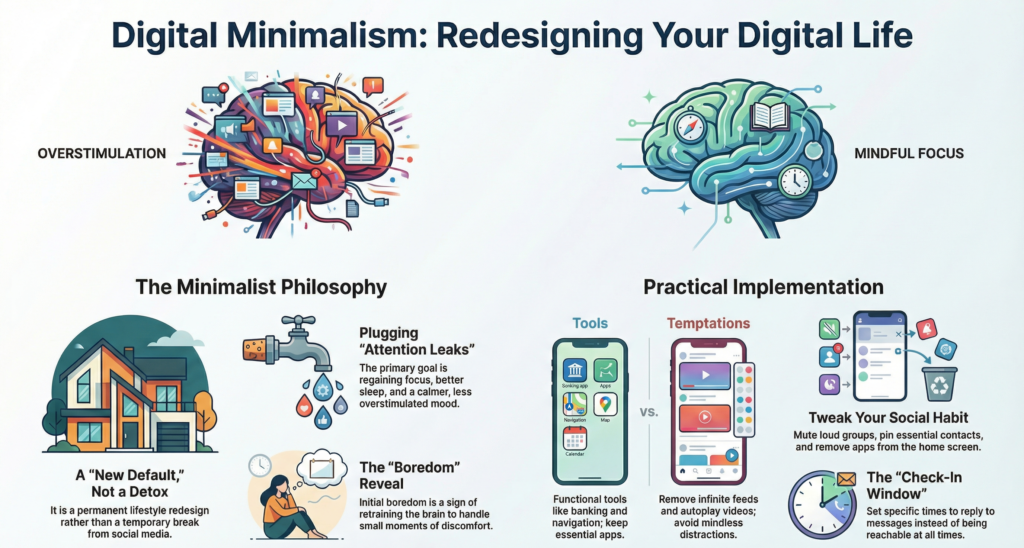
Not quite. A detox is usually temporary (a weekend off, a month off socials). Digital minimalism is more like a new default. Less “I’m quitting” and more “I’m redesigning.”
Do I have to delete social media to be a digital minimalist?
Nope. You can keep it — but you change how you use it. Like: no push notifications, no “just checking,” and no letting it live on your home screen like a candy bowl.
What’s the point of digital minimalism?
The point is that your attention stops leaking everywhere. People usually do it for calmer moods, better sleep, more focus, or just because they’re tired of feeling tugged around.
How do I start if I use my phone for work?
You separate “tools” from “temptations.” Email, calendar, navigation, banking — tools. Infinite feeds, autoplay videos, rage-bait comment sections — temptations. Work phones can still be minimalist. (Sometimes they need it most.)
Will I get bored?
At first, yeah. That’s kind of the whole reveal. You’ll realize how often you reach for your phone to avoid tiny moments of discomfort — waiting in line, a quiet elevator, a single awkward feeling. That boredom fades, and then you start doing real-life stuff again. Weird.
What if all my friends communicate in group chats?
Then you don’t nuke messaging. You tweak it. Mute the loudest groups, pin the important ones, and set a “check-in window.” Also: you’re allowed to say, “I’m slow to reply.” The world survives.
Is digital minimalism only for productivity people?
Surprising detail: no. A lot of people use it because they’re overstimulated, anxious, or just tired of being “reachable” all the time. And yeah, some people use it as a quiet flex — “my phone is boring” is the new “I don’t watch TV.” But the useful version is for anyone with a brain.
How long does it take to feel better?
It depends. Some people feel relief immediately after turning off notifications. Others need a week or two to stop reflex-checking. Think “retraining,” not “instant enlightenment.”
What digital minimalism looks like when it’s not a lecture
Here are three very real, very specific moments that usually push people into this:
1) The notification pile-up.
You open your lock screen and it’s a little wall of: “New post,” “New deal,” “Someone liked a comment,” “Your memories,” “Trending now,” “Time sensitive!”
Half of it is not urgent. Some of it is literally an app begging to be opened like a toddler with a kazoo.
2) The feed booby traps.
You go to reply to a message, and the app “helpfully” places a new video right there, already autoplaying, volume mysteriously on.
Or you open a social app and the first thing you see is a comment fight you never signed up for. Cool.
3) The “one quick search” trap.
You search “how to clean white sneakers,” and suddenly you’re in a 14-slide carousel about someone’s morning routine, and you’ve forgotten you own feet.
And here’s the part people don’t say out loud: digital minimalism isn’t just less screen time. It’s less mental tabs.
Your phone isn’t only stealing minutes. It’s stealing the clean feeling of having one thought at a time.
Digital minimalism isn’t about using your phone less. It’s about needing it less.
A quick mini-story: the “I’m just checking” lie (we all do it)
Last week I was waiting for a friend to text back about dinner plans.
So I picked up my phone to “just check messages.”
No message.
I flicked over to a social app without thinking.
Two minutes later I was reading a comment thread that started with an iphone tutorial and ended in people arguing about the meaning of “cringe.”
Then I opened my email. For no reason.
Then I remembered dinner.
Then I checked messages again. Still nothing.
When the text finally arrived, I felt weirdly… irritated? Like my brain had been running in place.
That’s the feeling digital minimalism is trying to fix.
Digital minimalism vs. related terms (don’t mix these up)
Digital minimalism gets lumped in with a bunch of other “I’m tired of my phone” phrases. Here’s the difference in plain English:
Digital minimalism vs. digital detox
- Detox: temporary break (“I’m off socials for 30 days”).
- Minimalism: permanent-ish setup (“I use socials, but I control it”).
Digital minimalism vs. “decluttering your phone”
- Decluttering: mostly aesthetic (folders, deleting old screenshots, reorganizing).
- Minimalism: behavioral (notifications, default habits, what gets your attention).
Digital minimalism vs. “touch grass”
- Touch grass: a joke (sometimes affectionate, sometimes not).
- Digital minimalism: a strategy. Still funny, but more intentional.
What to delete, what to keep, what to hide (without going scorched-earth)
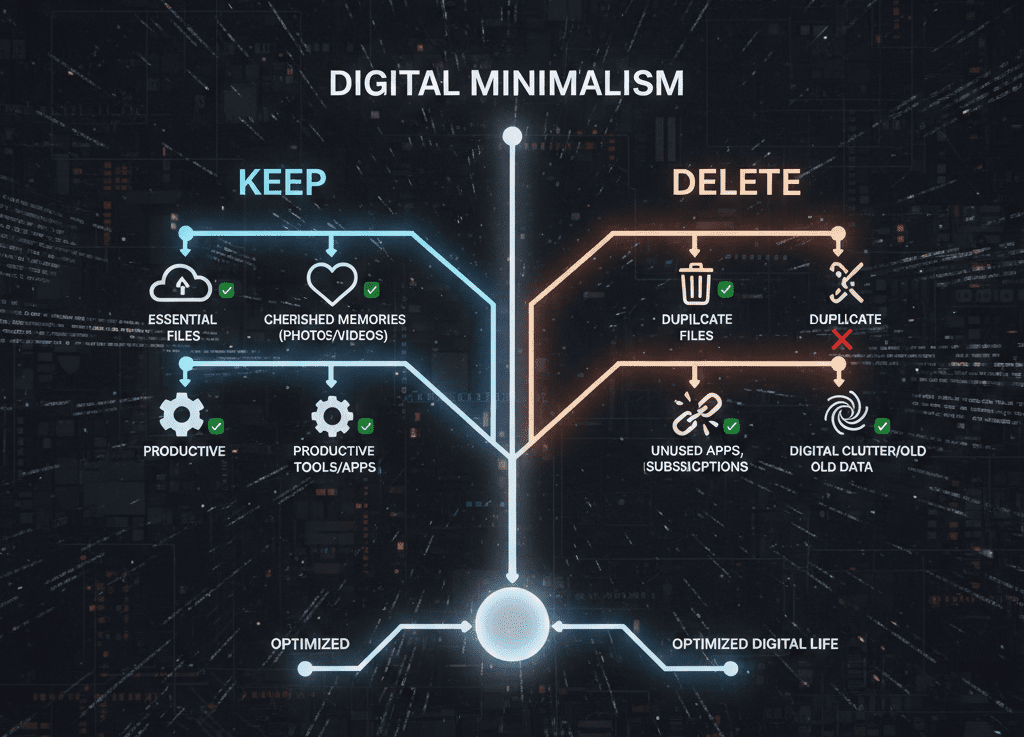
If you want an easy rule: keep things that serve a clear purpose, and remove things that feed on your attention.
Here’s a simple checklist that doesn’t require a personality transplant:
Keep (usually)
Messaging, maps, camera, music, calendar, banking, notes, authenticator apps, work tools you actually need.
Hide or limit (often)
Anything with infinite scroll, autoplay, algorithmic “For You” feeds, or notifications that exist purely to pull you back.
Delete (at least for the reset)
The apps you open when you’re stressed, bored, lonely, or procrastinating. You know the ones. Your thumb knows the ones.
A fresh, specific metaphor (one, I promise): your phone is like a TV remote that keeps adding buttons every week — eventually you can’t even find the volume. Digital minimalism is you ripping off the extra buttons.
If you’re trying to stop reflex-opening the same two apps, a blocker-type tool that interrupts specific apps or times can help. […..]
If your main issue is “my home screen is basically a carnival,” a minimalist launcher-type tool that reduces visual clutter can help. […..]
7-day digital minimalism reset (not dramatic, just effective)
You don’t need a perfect new lifestyle. You need a short experiment that gives you clear feedback.
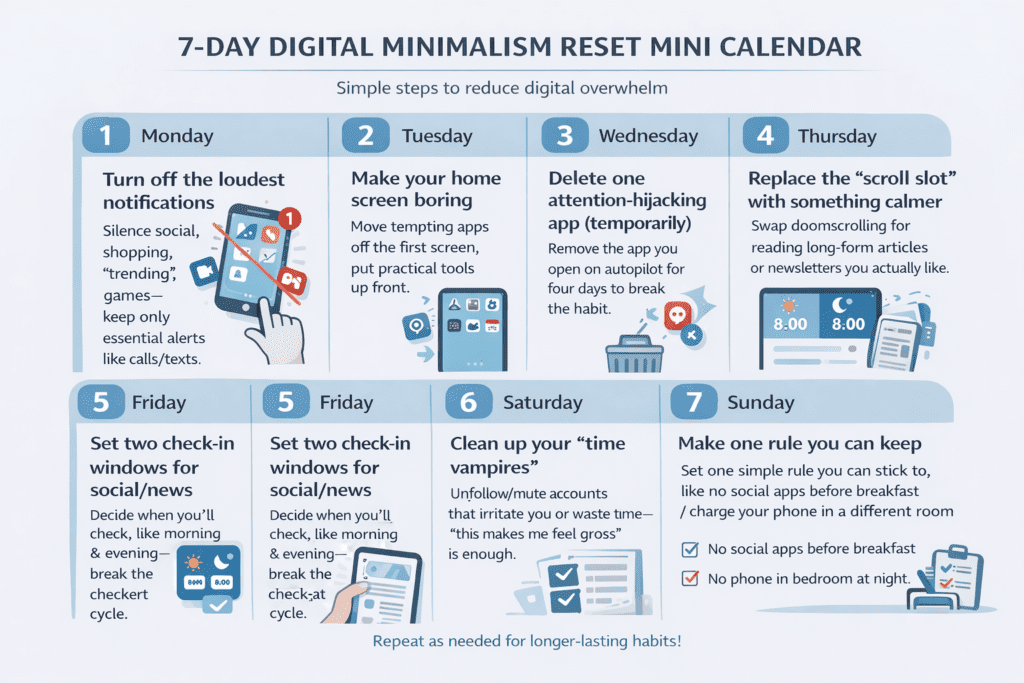
Day 1: Turn off the loudest notifications
Not all notifications. Just the ones that make you feel yanked: social, shopping, “trending,” games, random “we miss you” stuff. Keep calls/texts if you need them.
Day 2: Make your home screen boring
Move tempting apps off the first screen. Put tools up front (maps, calendar, camera). Make the fun stuff harder to reach. Friction is your friend.
Day 3: Delete one attention-hijacking app (temporarily)
Pick the app you open on autopilot. Delete it for four days. Not forever. Just long enough to break the reflex.
Day 4: Replace the “scroll slot” with something calmer
If you always reach for your phone in line, on the couch, in bed — give yourself a replacement that doesn’t bite. Think: saved long-form reads, a reader app, a newsletter inbox you actually like.
If you’re trying to swap doomscrolling for “I still want to read stuff,” a newsletter/reader-type app that saves articles cleanly can help. […..]
Day 5: Set two check-in windows for social/news
Morning and evening, or lunch and after work. Whatever fits your life. The key is: you decide when you check — not the app.
Day 6: Clean up your “time vampires”
Unfollow/mute the accounts that leave you irritated, insecure, or weirdly empty. You don’t need a moral reason. “This makes me feel gross” is enough.
Day 7: Make one rule you can keep
Not a manifesto. One rule. Examples:
- No social apps before breakfast.
- No phone in bed (charge it across the room).
- Notifications off except people.
Mistakes to avoid (aka how to not make this cringe)
Digital minimalism is easy to mess up in a way that makes you hate it. Here are the common faceplants:
The “midnight purge” mistake
Deleting everything in a burst of anger usually backfires. You wake up and re-download it all, plus a little shame on top.
The “I’m better than you” tone
If you start preaching, people stop listening. Also, you’ll stop enjoying it. This is a personal upgrade, not a purity test.
Confusing minimalism with deprivation
If you remove every fun thing, you’ll rebound hard. Keep joy. Just remove the stuff that makes you feel scattered.
Leaving your triggers untouched
If your biggest issue is the lock screen lighting up nonstop, but you only reorganize folders… you’ll still feel pulled around.
If your phone feels ‘urgent’ all day, it’s not a willpower problem. It’s a settings problem.
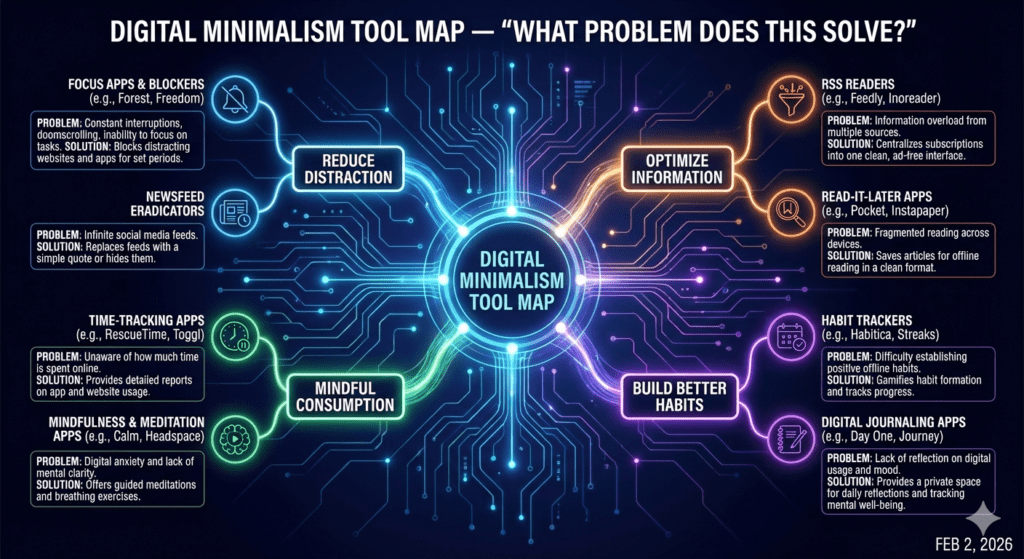
Tools that fit digital minimalism (no hype, just what they’re for)
You don’t need tools to do this, but the right type of tool can make it easier — especially in the first week.
Minimalist launcher-type tools
These reduce visual noise: fewer icons, simpler home screens, less “tap me!” energy. Helpful if you get distracted just looking at your phone.
App/time blocker-type tools
These add friction: limits, schedules, “are you sure?” pauses, or full blocks during certain hours.
Dumbphone-style options
This can mean an actual basic phone, or a “dumbphone mode” setup where your smartphone only has essential tools. People do this when they want a hard boundary.
Newsletter/reader-type apps
If you still want content but hate feeds, these can shift you toward reading things you chose — not whatever an algorithm threw at you.
If you’re trying to keep your smartphone but stop it from feeling like a slot machine, a dumbphone-mode setup (or dumbphone-style option) can help. […..]
If you want to learn what your phone already offers before adding anything, it’s worth checking built-in focus tools first. […..]
A few “official” guides worth bookmarking (because built-in tools exist)
And if you’re sitting there thinking, “Okay… but do I really need all this?” — here’s a simple test: Does your phone help you live your life, or does it keep interrupting it?
If it’s the second one, digital minimalism is just you taking the steering wheel back. No incense required.
Quick note: some links in this post may be affiliate links, meaning I may earn a small commission if you buy through them — at no extra cost to you. I only use them to point to helpful tool types, not to yell “BUY NOW.”